
Bring your tracks to your own website
Muzlo widgets let you drop a small, good-looking player onto any site you own — no code, just an embed snippet and a few colors to match your brand.
If you have ever wanted a simple audio player on your own website — for a demo reel, a podcast trailer, a set of lecture recordings, a portfolio of mixes — you have probably run into the same two options: upload the file and let the browser's plain, unstyled controls sit awkwardly on the page, or wire up a whole media player library just to press play on three tracks.
Widgets are Muzlo's answer to that. Pick the tracks you want to share, choose a couple of colors, copy one snippet, and you have a small embedded player living on your site — pulling straight from your Muzlo library.
What a widget actually is
A widget is a curated, named playlist from your own library, paired with a color theme. You decide exactly which tracks belong to it — nothing else in your account is exposed. It lives at its own private link, and that link is what you embed.
Nothing about the widget requires your visitors to have a Muzlo account, log in, or install anything. They see a small player: cover art, a track list, play/pause, and a progress bar — styled the way you set it up.
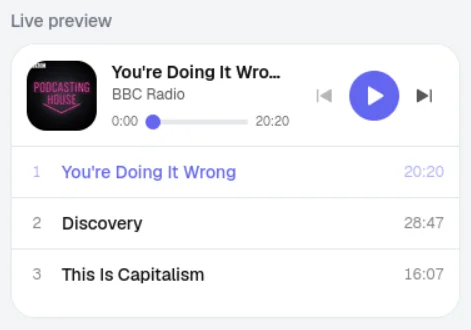
Setting one up
From your account menu, open Widgets and create a new one. From there:
- Add tracks. Search your own library and add whichever tracks belong in this playlist, in whatever order you want them to play.
- Pick your colors. Three color pickers — accent, background, and text — cover the look of the player. Change them and watch the live preview update instantly.
- Copy the embed code. A ready-to-paste
<iframe>snippet is sitting right there, one click away from your clipboard.
Paste that snippet into your site's HTML — a blog post, a landing page, an "About" section, wherever it fits — and the player shows up, already themed, already playing from your track list.
It stays under your control
Everything about a widget can change after it is live, and those changes apply immediately everywhere the widget is embedded:
- Swap tracks or reorder them any time — no need to touch the embed code on your site again.
- Recolor it to match a redesign.
- Turn it off with a single switch if you want the player to go quiet without deleting it.
- Regenerate the link if you ever need to retire an old embed and start fresh.
Only tracks you explicitly add to a widget are ever reachable through it — your private library stays private, and each widget only ever plays what you chose to put in it.
A few places this is handy
- A single track landing page for a new release.
- A "listen to a sample" player next to a course or lecture series.
- A running playlist embedded in a personal blog post.
- A demo reel on a portfolio site.
If you would rather build your own player interface instead of using the embedded one, that is possible too — Muzlo widgets also expose a small public API alongside the embed, which we cover in the next post.